Selling Canva templates on Etsy is a digital product business: you design a file, a buyer pays, and you deliver a download or a template link. There is no shipping and no printer. The work is the design, the listing, and staying inside two sets of rules: Canva’s content licence, and Etsy’s fees and policies.
This guide is a step-by-step walkthrough of those rules, including what you can do without Canva Pro and what “for free” actually covers. We read Canva’s official Content License Agreement and Etsy’s official fee pages on November 23, 2026. We are not giving legal advice, and we are not promising sales. A template that nobody searches for will not pay you, no matter how carefully you follow the licence.
If you would rather sell a physical object, our print on demand guide and our handmade jewelry guide cover those fee stacks, and Printful vs Printify compares the two main print suppliers with prices checked on November 23, 2026. For the wider list of online options, see the guide to 50 ways to make money online.
Can you sell Canva templates without Canva Pro?
Yes, if the template uses only Canva’s Free Content plus work you created yourself. You do not need a Pro subscription to sell a template built that way.
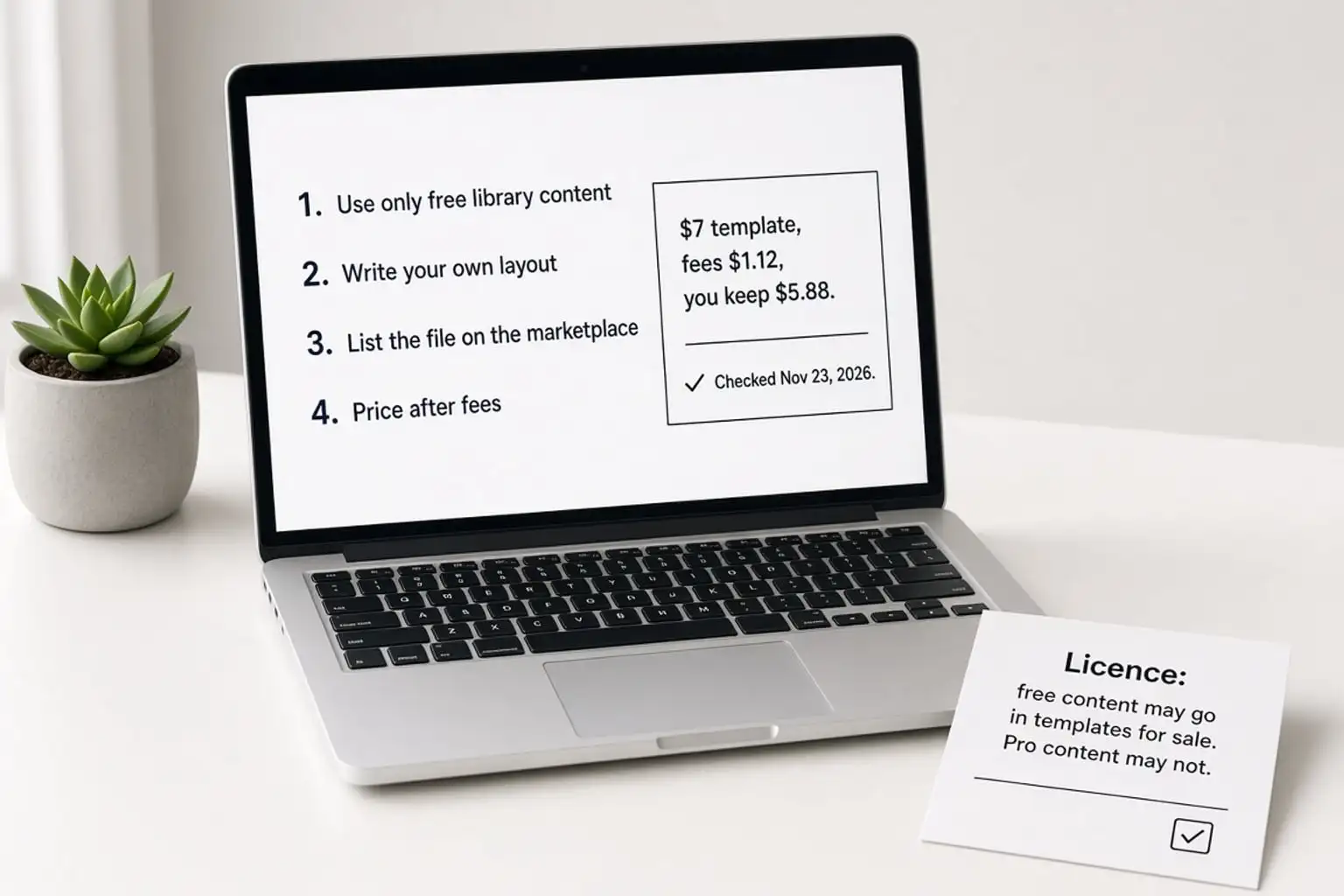
Canva’s licence draws a hard line between Free Content and Pro Content. The extra rights that let you put Canva content into templates for sale apply to Free Content only. The agreement says, after listing those extra rights: “If your Canva Design contains any Pro Content, you can’t use it for these purposes.”
So “without Canva Pro” is not a workaround. It is the version of the licence that actually permits resale of templates to third parties. A Pro subscription gives you access to Pro Content, which you may not put into a template you sell on Etsy. If you already have Pro, turn off Pro Content in the editor, or check every element, before you export.
Editorial, Education, Branded and Disney content have their own extra limits in the same agreement, and several of those uses are non-commercial. Leave them out of anything you sell.
What Canva’s licence actually allows
We are paraphrasing a legal document. Read the Content License Agreement yourself before you list anything. The points below are what the page said on November 23, 2026.
Free Content comes with a worldwide licence to use it for the permitted uses in the agreement. On top of the shared list, section 6 adds rights “for Free Content only,” including:
- using the Free Content in more than one Canva Design without obtaining an additional licence
- downloading the Free Content on a standalone basis
- using it “in templates for websites, social networking websites, documents, projects or otherwise for distribution and/or sale to third parties”
- using it “in design template applications intended for resale, whether online or not,” with examples such as website templates, business card templates, electronic greeting cards and brochure design templates
Pro Content is licensed as a “One Design Use License”: a perpetual licence to use it in a single Canva Design, for the permitted uses in sections 5 and 7. You may not copy, download or distribute Pro Content as a standalone item. The shared permitted uses in section 5 include “design templates solely for use on Canva.” That is a narrower right than section 6, and section 6 is closed to any design that contains Pro Content.
What you may not do, in section 9, includes sub-licensing, re-selling, renting, lending, assigning, gifting, or otherwise transferring or distributing “the Content or the rights granted under this Content License Agreement” (with a narrow exception for client work in section 4A). In plain terms: you can sell a template you designed that includes Free Content, under the extra rights in section 6. You cannot turn Canva’s library items themselves into the product, and you cannot pass Canva’s licence on as if it were yours.
Your own typography, layout, text and graphics that you created, and that do not include Canva Content, are not what this agreement is licensing to you. The agreement governs Canva’s Content. Keep a clean design: Free Content you are allowed to use, plus your own work, and nothing from the Pro library.
What “for free” covers, and what it does not
You can start without paying Canva, if you stay on a free Canva account and use only Free Content. Etsy, however, still charges its listing fee whether or not the item sells, and it takes a cut of every sale. Your time is not free. “How to sell Canva templates on Etsy for free” is a search about avoiding a Canva subscription and avoiding an expensive setup, not about a shop with no costs.
Budget at least:
- $0.20 USD each time you publish or auto-renew a listing, per Etsy’s Fees & Payments Policy
- the sale fees below, when something sells
- any photos, a mockup of your own sample, and the time to write the listing and answer messages
You do not need a paid website to start. Etsy is the storefront.
Etsy’s fees on a $7 template, checked November 23, 2026
We used the same official Etsy pages for a digital file as we would for a shipped item, read on November 23, 2026. A digital template has no shipping charge, so the fee base is the item price.
For a US bank account, on a $7.00 template, with no sales tax in the fee base and no Offsite Ad:
| Line | Amount |
|---|---|
| Item price | $7.00 |
| Listing fee | −$0.20 |
| Transaction fee, 6.5% of $7.00 | −$0.46 |
| Payment processing, 3% of $7.00 + $0.25 | −$0.46 |
| Etsy fees in total | $1.12 |
| Left before tax and your time | $5.88 |
That is 16% of the $7 price. The rates come from Etsy’s Fees & Payments Policy (listing $0.20 and the 6.5% transaction fee), and from Etsy’s Payments Policy and processing-fee help article (United States: 3% + $0.25 USD). The 6.5% and the processing calculation are also described in Etsy’s fees help article.
If the same $7 order arrived through an Offsite Ad at 15%, Etsy would charge another $1.05, leaving $4.83. Below $10,000 USD in sales over the prior 365 days you can opt out of Offsite Ads; above that threshold, participation is required, per the Fees & Payments Policy. Processing rates differ by country: 4% + £0.20 in the United Kingdom, 4% + €0.30 in much of the euro area, from the same official table.
On a $7 file the fixed $0.20 and $0.25 matter more than they do on a $38 piece of jewelry. If you raise the price, the percentages stay, but the fixed fees shrink as a share. Price for the work in the file, then check the leftover. The earnings per hour calculator is the right tool once you know how long a template takes you; the side hustle income calculator is useful if you want a monthly view.
Topic hubDigital products: Templates and small digital files
Step by step
1. Read the licence, then set the editor up so you cannot grab Pro Content by accident. If you have a Pro account, filter the library to Free Content, or use a free account for the commercial templates. Check every photo, icon, font and illustration.
2. Pick a specific job, not a generic category. “Planner” and “resume” are crowded. A resume for a particular trade, or a price list for a particular service, is a product a buyer can recognise in a thumbnail. Our digital products hub makes the same point: specificity is the defence against a file that anyone can copy by Friday.
3. Design the template so a buyer can use it in ten minutes. Include a short instruction file: how to open it, which fields to edit, and what they may and may not do with it. Say whether the licence you grant the buyer is for personal use, or also for their own client work. That buyer licence is yours to write. It does not replace Canva’s licence to you.
4. Export in the form Etsy buyers expect. Many shops deliver a PDF, a set of PNGs, or a link to a Canva template the buyer can copy. If you deliver a Canva link, the buyer will need a Canva account, and you should say so in the listing. If you deliver files, make sure every included asset is either your own work or Free Content you are allowed to distribute that way.
5. Open or use your Etsy shop, and list the file as a digital download. Write a title a buyer would search, show a clear preview, and state the file type, the software needed, and your licence to the buyer in the first lines. Etsy charges the $0.20 listing fee when you publish.
6. Set the price after the fees above. Work backwards from the leftover you need, including time for messages and revisions. A $7 template is a worked example, not a recommended price.
7. Deliver promptly, and keep a record of the sale and the files you sent. Tax rules depend on where you live. Etsy may collect some taxes from the buyer; that does not always settle your own income tax. Ask a tax adviser in your country if you are unsure.
8. Do not scale by stuffing the library. Ten specific templates, each one maintained, beat a hundred near-duplicates. Retired listings still cost time. Update a file when a tool or a rule changes, and message recent buyers if you have promised updates.
Listings, previews and the licence you give the buyer
Buyers cannot flip through the file before paying, so the preview has to do that job. Show the first page, a close-up of the editable bits, and a mockup in a setting that matches the use (a wedding table, a desk, a phone). Do not paste a Canva stock scene you are not allowed to use as a standalone sales image if the licence would not cover that use.
Write the buyer’s licence in ordinary language:
- what they may do (edit, print, use for their own clients, or not)
- what they may not do (resell the template, share the Canva link publicly, claim the design as their own stock)
- whether they may use it in paid ads or only in their own documents
Keep that consistent with what Canva allowed you to do. You cannot grant the buyer rights you do not have.
Who should skip this, and a realistic first week
Skip it if you were counting on Pro photos and Pro illustrations to make the templates look expensive. The licence does not let you sell those. Skip it if you need income this month; new digital shops often wait. Skip it if you do not want to write listings and answer “how do I change the colour” emails.
A realistic first week is: read the licence, design one template with Free Content only, export a preview, write the listing and the buyer licence, and publish. Do not open ten listings on day one. Watch which search terms and previews get favourites, then make the second file.
Canva’s own Design School has free courses on the editor if you need the mechanics. The business part is the licence, the fees and a product someone is already trying to find.
FAQ
Can I sell Canva templates on Etsy for free?
You can avoid a Canva subscription by using only Free Content on a free account. Etsy still charges $0.20 to list and takes a percentage plus a fixed processing fee when the file sells. Your time is a cost as well.
Do I need Canva Pro to sell templates?
Not if the template contains no Pro Content. If it does contain Pro Content, Canva’s licence says you cannot use the extra resale rights in section 6.
Can I include Canva photos and icons in a template I sell?
Free Content, yes, under the extra rights in section 6, as the agreement stood on November 23, 2026. Pro Content, no. Check each element. When in doubt, replace it with your own work or with Free Content.
How much does Etsy take on a digital download?
For a US bank account, on a $7 file with no shipping and no Offsite Ad, $1.12 in our worked example, leaving $5.88 before tax and your time. Other countries have different processing rates. Confirm on Etsy’s fee pages, which change.